MCP Server
AIOZ Storage provides an MCP server that lets MCP-compatible Super Intelligence assistants work with AIOZ Storage vector buckets, indexes, and vectors. Use it when you want an assistant to create vector resources, insert vectors, retrieve vectors, or run vector search through natural-language prompts.
Use it to manage storage and run vector search through natural-language prompts.
Connect
Add the AIOZ Storage MCP server to an MCP-compatible client using HTTP SSE transport.
Use this SSE URL:
https://mcp.aiozstorage.network/sseAfter the client connects, it should show the AIOZ Storage S3 and vector tools.
Authentication
Every MCP tool call requires AIOZ Storage credentials in the tool arguments:
| Argument | Description |
|---|---|
S3_ACCESS_KEY_ID | AIOZ Storage access key ID. |
S3_SECRET_ACCESS_KEY | AIOZ Storage secret access key. |
Example:
{
  "S3_ACCESS_KEY_ID": "your-access-key-id",
  "S3_SECRET_ACCESS_KEY": "your-secret-access-key",
  "vectorBucketName": "your-vector-bucket"
}
Use credentials with only the permissions required for the task. S3 tools send each operation to the S3 gateway, which checks the grant's permissions for that operation. Vector tools use Vector Access Grant credentials.
Important: To create, list, get, or delete vector buckets with the MCP server, first create a Vector Access Grant with All Buckets scope, then generate credentials from that grant. Bucket-level tools require credentials that can operate across vector buckets.
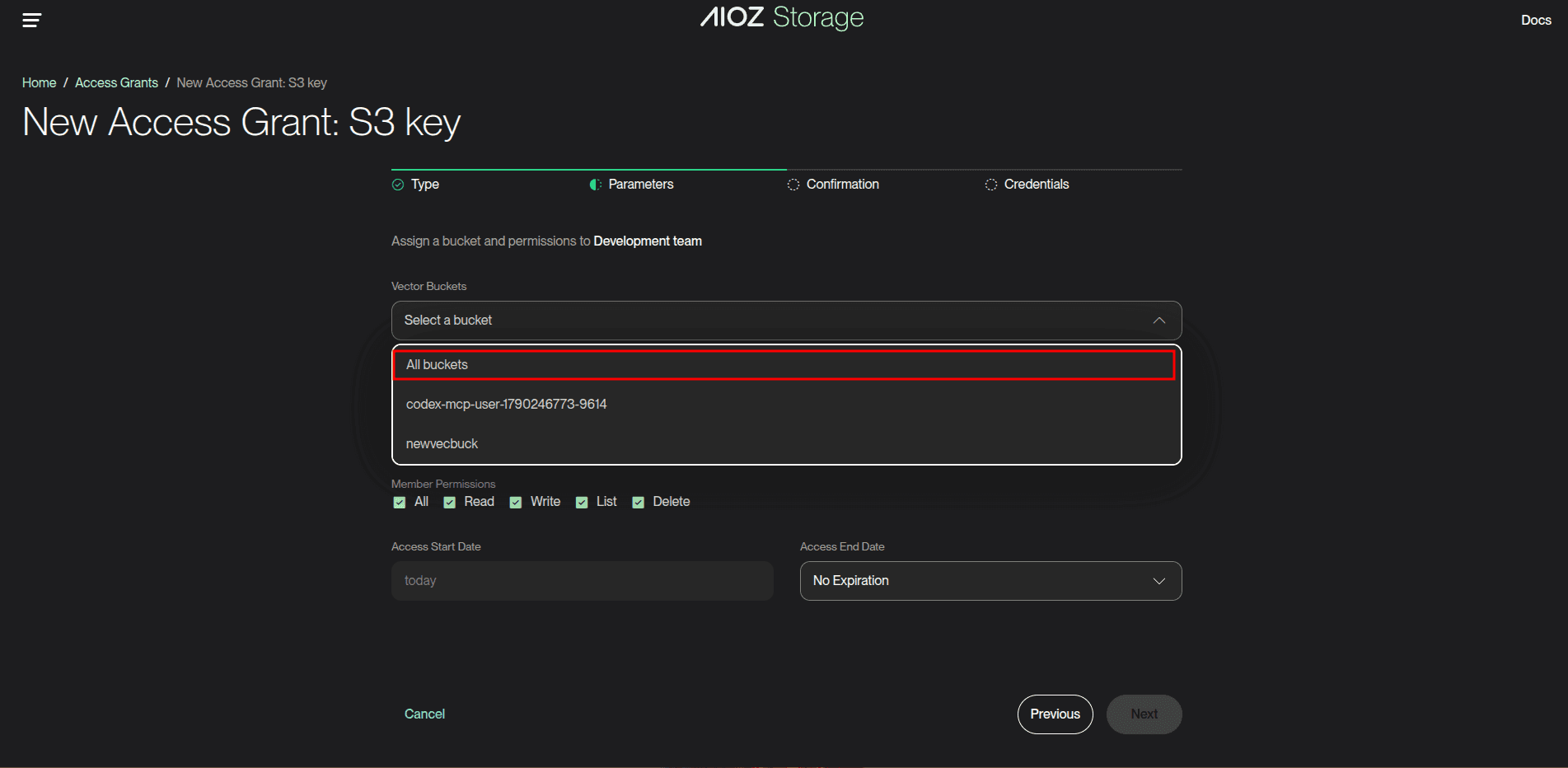
If your MCP client supports saved secrets, store these values in the client and let the client pass them to each tool call. Otherwise, include them when you ask the assistant to perform an operation.
For S3 tools, create an S3 Access Grant and generate credentials from it. A grant scoped to one bucket can be used for object operations in that bucket. To create, list, or delete S3 buckets, use credentials with the necessary bucket-level permissions and All Buckets scope.
Example prompts
Once connected, you can use natural-language prompts in your MCP client.
Create a vector bucket named your-vector-bucket.Create a cosine vector index named your-vector-index in your-vector-bucket with dimension 1536.Upsert these vectors into your-vector-index and attach title and document_type metadata to each vector.Search your-vector-index for the 5 closest vectors to this query vector. Include metadata in the result.List all vector buckets, then list indexes inside your-vector-bucket.List the objects under docs/ in your-bucket, then read docs/overview.txt.Create an upload link for notes/summary.txt in your-bucket with content type text/plain.Tools
All tools require S3_ACCESS_KEY_ID and S3_SECRET_ACCESS_KEY.
S3 buckets
Required: S3 Access Grant credentials. Bucket management needs All Buckets scope and the relevant permissions. A bucket must be empty before you delete it.
| Tool | Required arguments | Optional arguments |
|---|---|---|
list_s3_buckets | None | None |
create_s3_bucket | bucketName | None |
delete_s3_bucket | bucketName | None |
S3 objects
Required: S3 Access Grant credentials with access to the selected bucket and the permission for the requested operation.
| Tool | Required arguments | Optional arguments |
|---|---|---|
list_s3_objects | bucketName | prefix, maxKeys, continuationToken |
get_s3_object | bucketName, key | encoding |
head_s3_object | bucketName, key | None |
put_s3_object | bucketName, key | contentType, expiresInSeconds |
copy_s3_object | sourceBucketName, sourceKey, destinationBucketName, destinationKey | None |
delete_s3_object | bucketName, key | None |
Vector buckets
Required: credentials generated from a Vector Access Grant with All Buckets scope.
| Tool | Required arguments | Optional arguments |
|---|---|---|
create_vector_bucket | vectorBucketName | tags |
list_vector_buckets | None | prefix, maxResults, nextToken |
get_vector_bucket | vectorBucketName | None |
delete_vector_bucket | vectorBucketName | None |
Vector indexes
| Tool | Required arguments | Optional arguments |
|---|---|---|
create_index | vectorBucketName, indexName, dimension, distanceMetric | None |
list_indexes | vectorBucketName | maxResults, nextToken |
get_index | vectorBucketName, indexName | None |
delete_index | vectorBucketName, indexName | None |
Vectors
| Tool | Required arguments | Optional arguments |
|---|---|---|
put_vectors | vectorBucketName, indexName, vectors | None |
get_vectors | vectorBucketName, indexName, keys | returnData, returnMetadata |
list_vectors | vectorBucketName, indexName | maxResults, nextToken, returnData, returnMetadata |
delete_vectors | vectorBucketName, indexName, keys | None |
query_vectors | vectorBucketName, indexName, queryVector | topK, filter, returnDistance, returnMetadata |
Limits
| Operation | Limit |
|---|---|
get_s3_object | Maximum 4 GiB of object content per call, matching the S3 gateway object size limit. |
put_s3_object.expiresInSeconds | 60 to 3600 seconds; defaults to 900 seconds. |
list_s3_objects.maxKeys | 1 to 1000 per page. |
create_index.dimension | Maximum 4096. |
list_vector_buckets.maxResults | Maximum 500. |
list_indexes.maxResults | Maximum 500. |
put_vectors.vectors | Maximum 500 vectors per call. |
get_vectors.keys | Maximum 100 keys per call. |
delete_vectors.keys | Maximum 500 keys per call. |
list_vectors.maxResults | Maximum 1000. |
query_vectors.topK | 1 to 100; MCP uses 10 when omitted or set to 0. |
| Vector metadata | Maximum 40 KB and 50 metadata keys per vector. |
| Filterable metadata | Maximum 2 KB per vector. |
Arguments
list_s3_objects
{
  "S3_ACCESS_KEY_ID": "your-access-key-id",
  "S3_SECRET_ACCESS_KEY": "your-secret-access-key",
  "bucketName": "your-bucket",
  "prefix": "docs/",
  "maxKeys": 100
}
If isTruncated is true, pass nextContinuationToken from the response as continuationToken in the next call.
put_s3_object
{
  "S3_ACCESS_KEY_ID": "your-access-key-id",
  "S3_SECRET_ACCESS_KEY": "your-secret-access-key",
  "bucketName": "your-bucket",
  "key": "docs/overview.txt",
  "contentType": "text/plain",
  "expiresInSeconds": 900
}
The tool returns a presigned url, method: "PUT", headers, and expiresInSeconds. It does not upload the file. Send the file directly to the URL using HTTP PUT and include every header returned by the tool. For example, when headers contains Content-Type: text/plain:
curl --request PUT --upload-file ./overview.txt \
  --header 'Content-Type: text/plain' \
  '<presigned-url>'
The S3 gateway checks the grant's write permission when the PUT request arrives. Keep the URL private until it expires; anyone with it can upload to that key. Uploading to an existing key replaces that object. Opening the URL in a browser tab sends a GET request and does not upload a file.
get_s3_object
{
  "S3_ACCESS_KEY_ID": "your-access-key-id",
  "S3_SECRET_ACCESS_KEY": "your-secret-access-key",
  "bucketName": "your-bucket",
  "key": "docs/overview.txt"
}
The response includes content, encoding, contentType, and size. Text is returned as UTF-8 by default. Set encoding to base64 to read binary content; a non-UTF-8 object returns an error in the default mode.
Use head_s3_object with the same bucketName and key when you need only the object's size, content type, ETag, modification time, or metadata. It does not download the object.
Use copy_s3_object to copy an object without passing its content through the assistant. Specify sourceBucketName, sourceKey, destinationBucketName, and destinationKey. The credentials need read access to the source and write access to the destination. Copying onto an existing key replaces that object.
create_vector_bucket
{
  "S3_ACCESS_KEY_ID": "your-access-key-id",
  "S3_SECRET_ACCESS_KEY": "your-secret-access-key",
  "vectorBucketName": "your-vector-bucket",
  "tags": {
    "environment": "production"
  }
}
create_index
{
  "S3_ACCESS_KEY_ID": "your-access-key-id",
  "S3_SECRET_ACCESS_KEY": "your-secret-access-key",
  "vectorBucketName": "your-vector-bucket",
  "indexName": "your-vector-index",
  "dimension": 1536,
  "distanceMetric": "cosine"
}
Supported distanceMetric values:
| Value | Description |
|---|---|
cosine | Cosine distance. |
euclidean | Euclidean distance. |
dot | Dot product distance. |
The MCP server also accepts l2 as an alias for euclidean and ip as an alias for dot.
The MCP server always creates float32 indexes.
put_vectors
{
  "S3_ACCESS_KEY_ID": "your-access-key-id",
  "S3_SECRET_ACCESS_KEY": "your-secret-access-key",
  "vectorBucketName": "your-vector-bucket",
  "indexName": "your-vector-index",
  "vectors": [
    {
      "key": "vector-1",
      "data": {
        "float32": [0.12, 0.42, 0.87]
      },
      "metadata": {
        "title": "Your document title",
        "document_type": "technical-guide"
      }
    }
  ]
}
Each vector must include:
key: a unique vector key in the index.data.float32: the vector values.metadata: optional JSON metadata.
The vector length must match the index dimension.
Use at most 500 vectors in one put_vectors call.
get_vectors
{
  "S3_ACCESS_KEY_ID": "your-access-key-id",
  "S3_SECRET_ACCESS_KEY": "your-secret-access-key",
  "vectorBucketName": "your-vector-bucket",
  "indexName": "your-vector-index",
  "keys": ["vector-1", "vector-2"],
  "returnData": false,
  "returnMetadata": true
}
list_vectors
{
  "S3_ACCESS_KEY_ID": "your-access-key-id",
  "S3_SECRET_ACCESS_KEY": "your-secret-access-key",
  "vectorBucketName": "your-vector-bucket",
  "indexName": "your-vector-index",
  "maxResults": 100,
  "nextToken": "",
  "returnData": false,
  "returnMetadata": true
}
Use nextToken from the previous response to continue pagination.
Set returnData or returnMetadata to true only when you need vector values or metadata in the response.
query_vectors
{
  "S3_ACCESS_KEY_ID": "your-access-key-id",
  "S3_SECRET_ACCESS_KEY": "your-secret-access-key",
  "vectorBucketName": "your-vector-bucket",
  "indexName": "your-vector-index",
  "queryVector": [0.11, 0.44, 0.86],
  "topK": 5,
  "filter": {
    "document_type": "technical-guide"
  },
  "returnDistance": true,
  "returnMetadata": true
}
topK defaults to 10 when omitted or set to 0.
Set returnDistance: true explicitly when you need distance scores. Set returnMetadata: true explicitly when you need metadata in the result.
Metadata filters can match direct key/value pairs:
{
  "document_type": "technical-guide"
}
They can also use operators such as $eq, $ne, $gt, $gte, $lt, $lte, $in, $nin, $and, $or, and $not:
{
  "$and": [
    { "document_type": "technical-guide" },
    { "views": { "$gte": 1000 } }
  ]
}
Issues
Missing credentials
Add both credential fields to the tool arguments.
Invalid credentials
Check that the access key and secret key are correct, match the tool family (S3 or vector), and have permission for the requested operation. An S3 grant scoped to one bucket can access objects in that bucket even if it cannot list every bucket.
Object too large
get_s3_object can return at most 4 GiB through MCP, matching the S3 gateway object size limit. put_s3_object only returns a URL; the file is uploaded directly to S3.
No query matches
Check that vectors were inserted into the expected bucket and index, the query vector has the same dimension as the index, and any metadata filter is not too restrictive.
See Also
- Access Grant - access grants and S3 credentials.
- Super Intelligence Memory - agent memory without managing embeddings.
- LLM Docs - machine-readable docs for coding assistants.